
SSD Slowdowns on Windows PCs & How to Fix Them
Modern Windows PCs ship with SSDs because they’re fast.
But many users discover something frustrating over time:
Their PC gets slower and their SSD wears out faster than expected.
DymaxIO® solves both problems.
It keeps Windows PCs fast and responsive and helps SSDs last much longer by reducing unnecessary wear — all automatically, in the background.
Why Windows PCs with SSDs Still Slow Down
SSDs are fast, but they are not immune to performance problems.
Over time:
- Windows writes data in small, inefficient pieces
- The system performs far more disk activity than necessary
- Frequently used data is repeatedly read from storage instead of memory
The result:
- Slower application launches
- Reduced responsiveness
- Increased wear on the SSD
This happens on laptops and desktops alike, even high-end systems.
SSD Wear Is a Real Problem (and It’s Avoidable)
Every SSD has a limited number of write cycles.
When Windows writes data inefficiently:
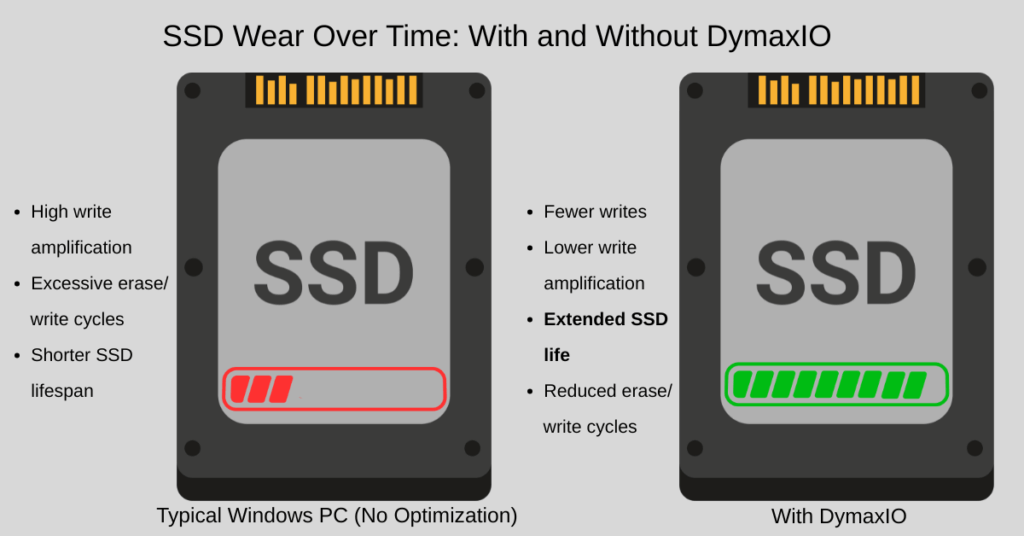
- Write amplification increases
- The SSD performs extra internal erase and write operations
- The drive wears out faster than it should
That leads to:
- Shorter SSD lifespan
- Earlier hardware replacement
- Lost value from expensive storage
How DymaxIO Improves Performance and Extends SSD Life
Faster, More Consistent Performance
DymaxIO prevents inefficient writes and reduces unnecessary disk I/O, helping Windows PCs stay fast and responsive as they age.
Significantly Less SSD Wear
By eliminating wasted writes and reducing write amplification, DymaxIO lowers the physical stress placed on SSDs — helping them last much longer.
Uses Fast System Memory Instead of Storage
Reading data from RAM is dramatically faster than reading from an SSD. DymaxIO intelligently uses available system memory to serve active data, reducing slow disk reads and further minimizing SSD wear.
Fully Automatic, Always On
No tuning. No schedules. No maintenance. DymaxIO continuously optimizes how Windows uses storage and memory in real time.
Faster Performance. Longer SSD Life.
That’s the core value DymaxIO delivers.
- Faster everyday computing
- Lower storage latency
- Fewer unnecessary writes
- Longer usable SSD lifespan
Try DymaxIO Risk-Free
- Free 30-day trial
- 30-day unconditional money-back guarantee
If DymaxIO doesn’t make your PC feel faster and help your SSD last longer, you don’t keep it.
Technical Details for Power Users
The Real Cause of SSD Performance Degradation
SSDs don’t slow down because of moving parts — they slow down because of how operating systems use them.
Inefficient Write Patterns
As free space becomes fragmented, Windows frequently writes data in small, scattered chunks.
These small writes increase write amplification, forcing the SSD to perform significantly more internal work.
More internal work means:
- Higher latency
- Lower throughput
- Accelerated wear
DymaxIO prevents these inefficient writes before they occur, ensuring data is written in larger, more efficient blocks.
Logical Fragmentation Still Matters on SSDs
While SSDs don’t suffer from mechanical seek delays, file-system fragmentation still causes:
- Increased I/O operations
- Higher CPU overhead
- More storage access per request
DymaxIO minimizes logical fragmentation at the point of creation, reducing unnecessary I/O overhead.
Storage Is Still the Slowest Tier
Even the fastest SSD is orders of magnitude slower than DRAM.
When Windows repeatedly reads the same data from disk:
- Latency increases
- I/O queues grow
- Application responsiveness suffers
DymaxIO intelligently uses available system memory to serve frequently accessed data, reducing reliance on slower storage and improving overall system responsiveness.
Reduced I/O Improves the Entire System
By reducing unnecessary reads and writes:
- Storage latency drops
- CPU wait states decrease
- Performance remains consistent under load
This is especially noticeable during multitasking, application launches, background updates, and heavy productivity workloads.
Why DymaxIO Is Different
DymaxIO is not a cleanup tool.
It is not a one-time optimizer.
It is a real-time performance engine that continuously improves how Windows interacts with storage and memory.
No hardware changes.
No manual intervention.
Just sustained performance and longer-lasting SSDs.
The Bottom Line
SSDs made PCs faster — but how Windows uses them still matters.
DymaxIO:
- Keeps Windows PCs performing at their best
- Reduces unnecessary disk I/O
- Extends the life of SSD storage
All while running quietly in the background.
Frequently Asked Questions About SSD Performance & DymaxIO
With DymaxIO, our SSDs will now last for a very, very, very long time. After 3 ½ years of heavy production use, our SSDs still have 98% of life! This must be some sort of monumental record. These SSDs could go for 10 years and still be fantastic thanks to DymaxIO.
– Erik Frees, IT Engineer at Marcus Food Co.
What People are Saying

What People are Saying
“Typically, IT professionals respond to application performance issues by reactively buying more hardware. Without the luxury of a padded budget, we needed to find a way to improve performance on the hardware infrastructure we already have. It saved us from having to make a heavy investment in SSDs or do a complete rip and replace of our entire hardware infrastructure. To this day, I still can’t believe software is doing this.”
R. Ortiz, IT Manager, ASL Marketing
“I have used Diskeeper since it was first introduced. It has always worked well in keeping my drive defragged for the fastest response times for all of my apps. Thank you again for this fine piece of software.”
Philip Baldwin, NVQB
“The Undelete software that we use on all our Regional Servers is undoubtedly worth every penny. It
has saved our Techs numerous hours in restoring files inadvertently deleted as opposed to having to
restore from backup tape.”
Michael Lucas, Gancom (Division of Gannet Fleming)
“Undelete saves backup restores when someone accidentally deletes a file from a Windows share. We store tapes off site so Undelete can save a big delay for file restores of that type. Undelete does what it says on the box – really – and it works nicely as a network recycle bin.”
Glenn Edwards, Infrastructure Analyst, Itron
“I have been using Diskeeper for many years, it is installed as a routine on all servers, networked clients, SHO and any other computer. It has never presented any problem and has always demonstrated improved drive performance in both servers and clients. With each new release Condusiv does not merely provide “window dressing”, they actually improve the product with the objective of making it easier to use, more reliable, more effective and easier to use.”
Mark Sills, Systems Administrator / Manager, Home User